Publication
Maxine Perroni-Scharf, Faraz Faruqi, SooYeon Ahn, Raul Eduardo Hernandez, Szymon Rusinkiewicz, William Freeman, Stefanie Mueller
VisiPrint: Previewing 3D-Print Appearances from Real Material Samples
MIT CSAIL, MIT, Princeton University, and Gwangju Institute of Science and Technology
In Proceedings of CHI ’26.
Videos
Coming soon.
VisiPrint: Previewing 3D-Print Appearances from Real Material Samples
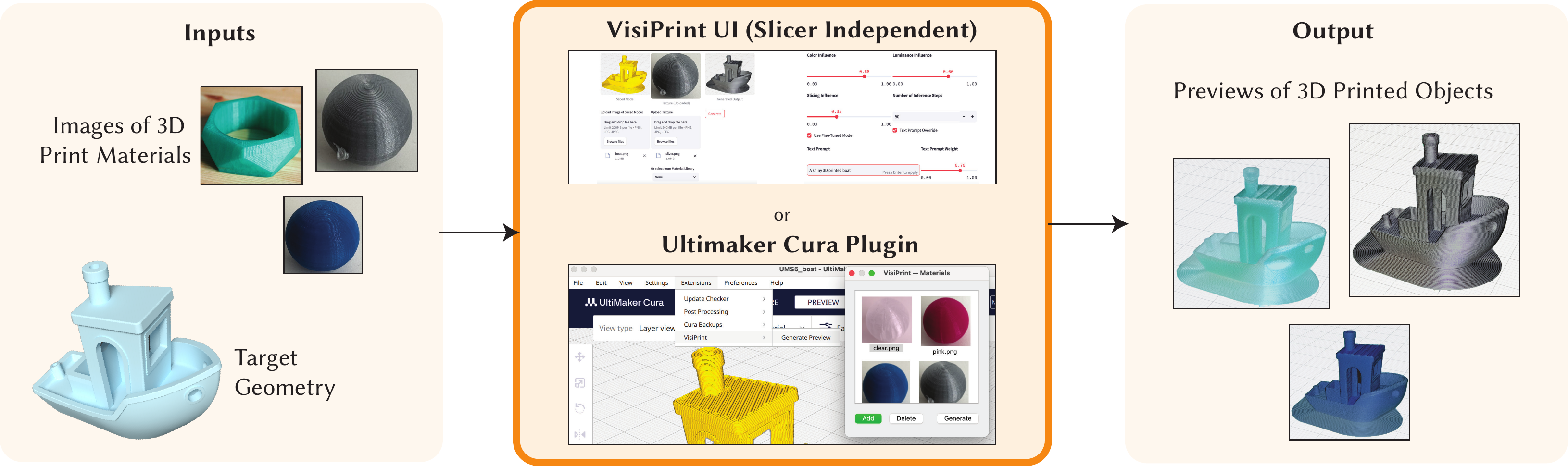 Figure 1. The VisiPrint workflow. The user slices a 3D model using their preferred software (e.g., Cura), then uploads a screenshot of the sliced view and a photo of the intended filament or printed exemplar. VisiPrint generates an appearance-faithful preview that reflects both slicing patterns and material characteristics.
We present VisiPrint, a tool for appearance-first previews of 3D-printed objects. Existing print preview slicers focus on toolpaths, not appearance, while pure rendering software is complex and cannot automatically reproduce slicing patterns. Prior work highlights persistent gaps between digital previews and printed results, such as color shifts, gloss/translucency changes, and layer-line highlights, motivating the creation of VisiPrint, an appearance-focused support tool. The VisiPrint algorithm combines slicer screenshots with filament photos via a custom diffusion-based synthesis pipeline. We present both a standalone user interface for VisiPrint compatible with any slicer and an Ultimaker Cura Plugin. We evaluate VisiPrint through a user study showing it is significantly faster, easier to use, and more faithful than alternatives: within a time-limit, participants completed 100% of preview tasks with VisiPrint, versus 63% with Cura and 13% with Blender. VisiPrint narrows the gap between design intent and printed appearance, complementing settings-centric tools with appearance-driven decision support.
INTRODUCTION
3D printing has transformed prototyping and manufacturing, empowering users to fabricate custom objects with a wide range of materials and printer settings. However, there is a critical gap that remains in the 3D printing workflow: the ability to accurately preview what a printed object will look like before fabrication. For Fused Deposition Modeling (FDM), the most popular type of 3D printing, most slicers and software offer print previews, but these primarily highlight layer-by-layer toolpaths rather than the material and visual characteristics of the final object. As a result, users are often left to guess how prints will turn out, which can lead to wasted time, filament, and effort when outcomes do not meet expectations. Prior works document persistent mismatches between print-previews and actual appearance arising from color-difference errors, interactions between gloss and perceived color, and FDM-specific surface cues such as anisotropic layer-line highlights. From an HCI perspective, these mismatches are not just rendering errors—they directly influence whether users judge a print as acceptable for display, prototyping, or everyday use. Prior perceptual work shows that observers are sensitive to small changes in color, gloss, and surface finish even when geometry is identical. Because prior work already links both slicing patterns and material properties to perceived quality, a preview that reflects both is especially valuable for HCI.
On the other hand, modeling and CAD tools like Blender and Fusion 360 can generate high-fidelity renders, but they do not account for the printing process. A render may depict a smooth, glossy object, while the printed result, shaped by layer height, support removal, artifacts, and filament texture, looks dramatically different. Neither these tools nor typical slicers capture the interplay between slicing patterns and material appearance that defines FDM’s distinctive look. Recently, mainstream slicers have released dedicated features to mitigate visible artifacts in 3D prints such as Prusa's seam painting, and Cura’s recent Z-Seam controls which enable fine-tuning of surface details, demonstrating that appearance is a practical concern in everyday workflows. Community discussions frequently raise 3D-printing issues due to appearance mismatches, such as color banding, needing to print personal color swatches to see how filament will actually look, and transparency falling short of “clear” claims, underscoring that appearance is a practical pain point for makers. Studies of fabrication platforms similarly show that missing appearance cues creates uncertainty, can increase the number of trial prints, and limits reuse of designs. Thus, print appearance can shape user decisions about whether to print an object, which filament to use, and whether the result meets a user’s standards.
Meanwhile, recent advances in computer vision techniques have brought fast, expressive visual synthesis to other domains (e.g., SDXL), while diffusion-based material transfer continues to progress (e.g., ZeST). Physically based pipelines estimate SVBRDFs and re-render the object, but they rely on controlled capture and calibrated alignment that everyday makers rarely have. Exemplar-driven methods such as MatCap and recent lightweight material-transfer models are easy to use but ignore FDM-specific cues like layer lines and seams. Yet no existing system leverages computer vision to preview the appearance of 3D prints from a user’s specific sliced input and chosen filament. As we demonstrate in our evaluation, out-of-the-box models struggle with domain-specific challenges such as slicing-induced microgeometry and limited training data. For example, we find that off-the-shelf SDXL cannot reliably synthesize images of 3D-printed objects, as this remains an underrepresented domain in its training set. To our knowledge, this is the first paper to directly target these domain-specific challenges for 3D-printed appearance preview.
At the same time, AI-assisted functionality has become standard in creative software, from photo editors (e.g., Photoshop) to illustration tools and animation pipelines. Bringing such capabilities to fabrication previews is a natural next step. But unlike purely generative image tasks, outputs must correspond to objects that will physically exist, not just be plausible renderings. This requires preserving key features such as geometry and slicing patterns. While 3D printing software has begun adding more appearance-oriented features (e.g., easier color/material selection and themed visual presets), reflecting demand for faster, more informative appearance decisions, to date no available tool employs AI to preview the 3D-printed look directly from a user’s own sliced input and materials on hand. Our work builds on HCI systems such as AIdeation, which show that workflow-aware, transparent AI can support creative exploration while keeping designers in control. We focus on an appearance-first preview that helps designers decide whether and how to print. A preview that reflects the user’s actual toolpaths and filament reduces visual uncertainty, and because of this, we treat appearance preview as a post-slicing step for setting expectations about the print.
To address this gap, we present VisiPrint (shown in Fig. 1), a post-slicing preview tool that operates alongside a user's preferred slicer and printer. VisiPrint accepts a slicer screenshot and a single material photo as inputs, and synthesizes previews that reflect both slicing patterns and filament properties. As shown in Fig. 2 and Fig. 3, it works with any slicer software and with any material example, requiring only image inputs from the slicer of choice's UI and material. VisiPrint aims to predict how prints are likely to look, rather than to predict print success. It complements, not replaces, slicer checks (e.g., supports, adhesion, print settings).
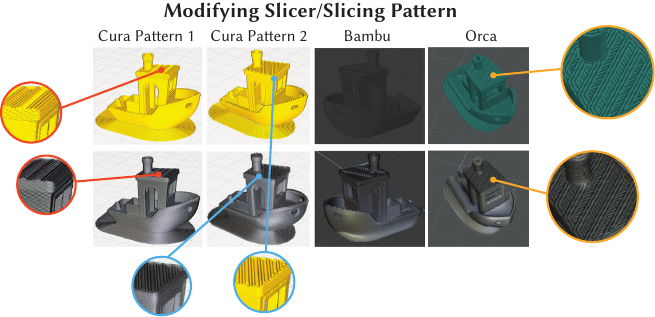 Figure 2. The Benchy boat being previewed in silver PLA across different slicing patterns and software programs.
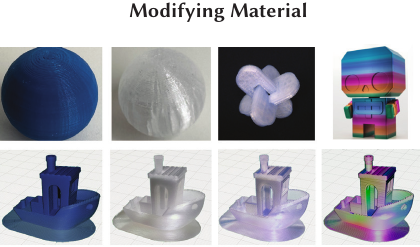 Figure 3. The Benchy boat previewed in home material samples (the blue and clear spheres) and samples found online, including challenging translucent and rainbow filaments.
RELATED WORK
Research in digital fabrication spans both appearance-focused tools, which address how prints look, and feasibility-focused tools, which ensure they succeed. From an HCI perspective, appearance is critical: it shapes perception, acceptance, and interaction with fabricated objects, yet it remains less explored than reproducibility. For example, Alcock et al. found that users on Thingiverse struggled with missing cues about how designs would actually print, underscoring the importance of effective previewing in reducing uncertainty during the 3D-printing process.
To situate our contribution, we first review work on appearance in 3D printing, then contrast it with feasibility, interaction, and vision-assisted fabrication, highlighting how each frames the user experience of making and evaluating artifacts.
Appearance-Focused 3D Printing Tools and Studies.
The gap between how prints are previewed and how they actually appear is well documented, and motivates the need for appearance-first tools. Yuan et al. emphasize the absence of standards for reproducing appearance on curved, glossy, or translucent prints. Galati et al. propose evaluation frameworks where aesthetic quality is judged by users and treated as a primary workflow concern. Together, these perspectives underscore that appearance is not incidental but central, shaping perception, satisfaction, and adoption. This motivates VisiPrint, which aims to preview aesthetic properties more faithfully than existing systems. By grounding previews in exemplars of real 3D-printed materials and matching color profiles, VisiPrint addresses these gaps, allowing users to anticipate printed appearance.
Color discrepancies are commonly quantified with the CIEDE2000 formula. In dentistry, for example, full-color 3D-printed casts deviate unacceptably from design intent, and similar mismatches occur in other medical models. For education and communication, lifelike visual properties add value beyond geometry alone. In prosthetics, appearance is tied directly to acceptance: studies have found that more natural-looking 3D-printed cosmetic covers improved aesthetics to user satisfaction. These examples reinforce the case for appearance as a first-order design concern in HCI, one that VisiPrint elevates from afterthought to previewable design variable.
Beyond color, other material properties significantly influence appearance. Condor et al. show that surface gloss alters perceived color and propose gloss-aware correction workflows. For translucent parts, appearance varies with thickness and subsurface scattering; Brunton et al. estimate optical properties from samples and apply inverse rendering to reproduce target translucency. Orientation also plays a role: Filip and Vítek find that observers consistently notice anisotropic highlights and layer-line banding. Elkhuizen et al. demonstrate the reproduction of paintings by jointly capturing gloss, color, and surface relief, making appearance, not geometry, the primary target. In manufacturing, Zhang et al. model orientation tradeoffs that explicitly include appearance, while Hartcher-O’Brien et al. show users distinguish surface finishes tied to FDM parameters beyond roughness metrics. Shape and lighting matter as well: Jiang et al. show perceived color shifts with geometry and illumination, while Hlayhel et al. find that “naturalness” in color prints depends on elevation and roughness. To accommodate these effects, VisiPrint previews not only material color but also gloss, translucency, and slicing artifacts, enabling users to anticipate banding direction and surface finish.
Mainstream slicers also reflect demand for better visible outcomes, with features like PrusaSlicer’s seam-hiding and Cura’s Z-Seam controls. While such features and prior work reduce discrepancies between intent and outcome, VisiPrint instead foregrounds expectation management. By integrating color, gloss, translucency, and artifacts, it reframes previews as tools for aligning user expectations with reality.
Interactive Fabrication Tools.
Feasibility and reproducibility remain central to digital fabrication research. Prior work often treats slicer parameters and machine settings as first-class artifacts for sharing and repeatability: SliceHub embeds slicing previews and metadata into repositories, while Subbaraman et al. introduce workflows for recording and reusing parameters. Other systems address variability and failure, including 3DPFIX for diagnosing failed prints and uncertainty frameworks.
VisiPrint addresses a complementary question: What will it look like? While not fundamental to success, visible outcome influences choices such as filament, orientation, slicing strategy, or whether to print at all. Appearance-first previews can complement settings-first and feasibility-first tools. By positioning the preview itself as an HCI intervention, VisiPrint reframes fabrication workflows around expectations management.
Vision and interactivity have also been used to provide feedback before and during fabrication. Don't Mesh Around uses real-time scanning for clay printing. SensiCut applies speckle imaging and deep learning to identify materials for safer laser cutting. Patching Physical Objects employs depth sensing to repair prints, while MultiFab monitors multi-material prints via 3D scanning. Other systems embed information directly into appearance: G-ID encodes slicer-parameter textures, while AnisoTag introduces anisotropic micro-patterns. Interactive fabrication has connected users more directly through direct manipulation, AR-integrated robotic printing (RoMA), mid-process reshaping (FormFab), mechanism remixing (Grafter), and shape-changing interface prototyping (MorpheesPlug). Spatial preview tools further situate models in context, such as Mix&Match, pARam, and TinkerXR. These works emphasize feasibility or interaction, while VisiPrint emphasizes pre-fabrication appearance, enabling informed decisions before committing material.
Image-Based Appearance Transfer and Diffusion Models.
Applying imaging and vision techniques to computational fabrication is still an emerging area of research, though appearance transfer and image generation are well studied. VisiPrint builds on material appearance transfer techniques, primarily ZeST, which applies pre-trained image-to-image translation with depth and illumination conditioning. Related methods include Cross-image Attention, which uses diffusion with semantic correspondences to transfer appearance without retraining, ReStyle3D, which aligns correspondences across multiple views, and Deschaintre et al., which adapts deep appearance models via targeted fine-tuning for large-scale transfer. Complementary to these transfer pipelines, a rich line of physically based work estimates material parameters for predictive rendering, including single-image SVBRDF recovery, two-shot acquisition, high-resolution inverse rendering, and physically based editing from a single photo, with semi-procedural material priors and procedural approaches to material synthesis.
Neural style transfer and diffusion approaches such as Alchemist enable parametric control over gloss and roughness, while Material Palette and Kocsis et al. extract material sets and perform probabilistic decomposition from single views. Image-space appearance editing and swapping spans both classical and recent techniques. Like VisiPrint, Anisotropic MatCap demonstrates that spherical material samples can capture how a material responds under a fixed illumination. Building on these advances, VisiPrint integrates FDM slicing patterns into ControlNet-guided Stable Diffusion. Conditioning on slicer-derived Canny edges and depth preserves geometry, lamination, and seam placement, while the exemplar transfers hue and sheen—explicitly coupling material and process for previews. To our knowledge, VisiPrint is the first system to combine exemplar-based transfer with slicer-derived structure in this way; SVBRDF/inverse-rendering, MatCap, and generic editing pipelines do not simultaneously reconstruct both real filament appearance and FDM slicing patterns. In contrast to these pipelines, which focus on material properties or generic image edits, VisiPrint specifically targets FDM fabrication: it fuses exemplar-based transfer with slicer-encoded depth and lamination structure so that previews reflect both real filament appearance and actual slicing patterns.
USER INTERFACE
Figure 4 shows the VisiPrint interface, designed for both novice and expert users. It supports a simple end-to-end workflow from model preparation to preview generation, while offering advanced controls for fine-grained customization.
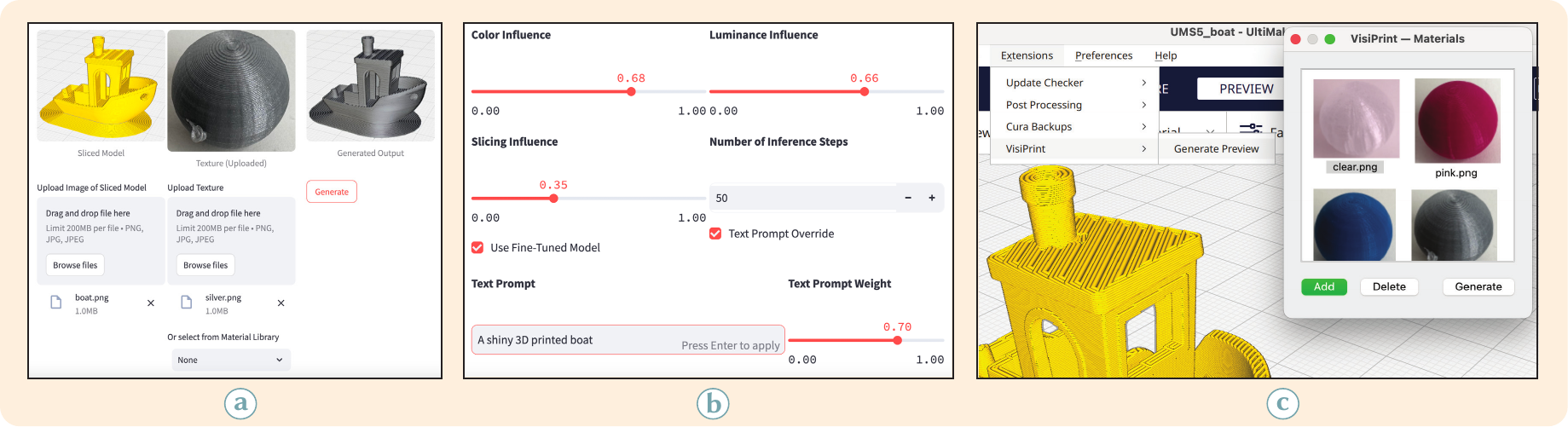 Figure 4. The VisiPrint interface. (a) The user uploads a sliced model screenshot and selects or uploads a material. (b) Advanced settings control color and luminance transfer, slicing pattern influence, custom prompts, and fine-tuned model usage.
Core Workflow.
As illustrated in Figure 4a, the workflow consists of three steps:
- Upload Sliced Geometry: The user provides a screenshot of the sliced model (e.g., from Cura or Bambu Studio), which encodes object shape, slicing pattern, and view direction.
- Select or Upload Material: A reference image of a printed object may be uploaded, or a preset chosen from the curated Material Library. Uploaded materials can also be saved for reuse.
- Generate Preview: Clicking Generate produces a photorealistic preview in under one minute, displayed alongside the input slicing image and material exemplar.
Advanced Settings.
The expandable Advanced Settings panel (Figure 4b) provides expert controls: Color Influence, for the degree of color transfer from the exemplar, Luminance Influence, for the impact of exemplar brightness and shading, Slicing Influence, for the visibility of slicing contours in the output, Text Prompt Override, for custom prompts and adjustable influence weights, Inference Steps, for the trade-off between speed and quality, and Fine-tuned Model, an option to use a Stable Diffusion variant trained on 3D print imagery.
By combining a streamlined workflow with advanced customization, VisiPrint enables both quick previews and detailed control over visualization. The “Slicing Influence” slider in Fig. 4b provides a user-facing control for adjusting the relative contribution of Canny edges and depth cues in our ControlNet conditioning (with “Slicing Influence” chosen as a more user-friendly term); this corresponds directly to the edge/depth weight settings evaluated in the ablation study in Section 7.4.
The interface also includes a small “Preview Limitations” information panel that clearly explains that outputs are simulated, notes that appearance depends on the exemplar’s lighting, and reminds users that VisiPrint is for appearance-only decisions; a screenshot is provided in the Supplemental Material.
Cura Plugin.
To allow users to interact with the preview functionality within their current workflows, we implemented a dedicated Ultimaker Cura plugin that lets users access VisiPrint directly in their slicing software (Figure 4c). Once a model is sliced, the plugin automatically captures a screenshot of the 3D viewport as the target geometry. Users can select or manage a local library of material exemplars directly in Cura, then generate previews via the Extensions / VisiPrint menu. The captured geometry and chosen material are processed by the VisiPrint pipeline, and the resulting preview is displayed in a zoomable viewer embedded within Cura. This integration eliminates the need for manual screenshot handling, providing a seamless loop between slicing and appearance evaluation.
METHOD
VisiPrint generates photorealistic previews of 3D-printed objects by combining material transfer with geometry and slicing-aware synthesis (Fig. 5). Users see both overall shape and how slicing and material affect appearance. At its core is a generative model conditioned on material exemplars and structural cues. We describe the core components of our method below, and quantitatively evaluate them later in Section 7.4.
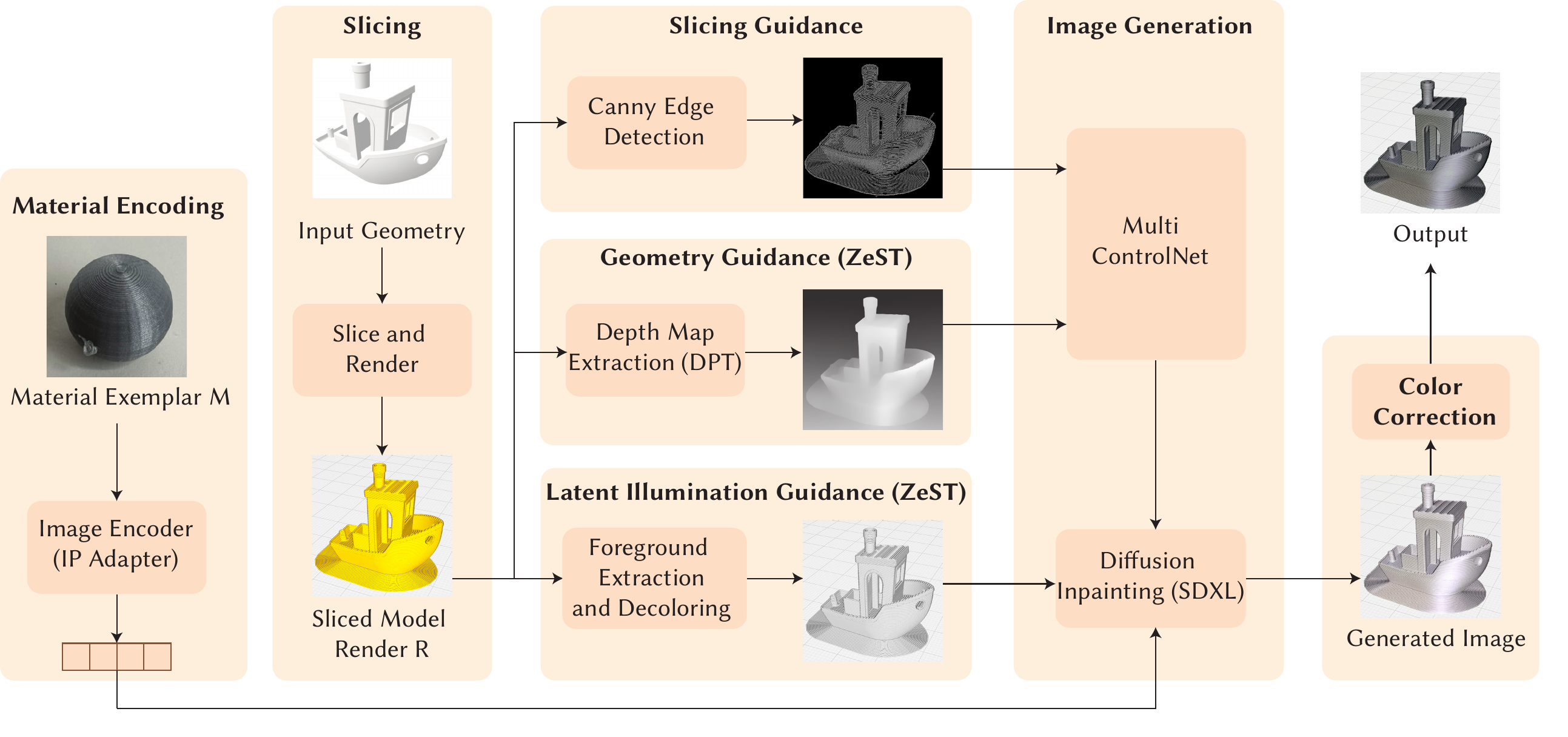 Figure 5. VisiPrint architecture: The system takes as input a material exemplar and a 3D geometry. The material is encoded, while the geometry is sliced and rendered. Slicing, geometry, and latent illumination cues guide image generation via a multi-ControlNet pipeline. The output is refined using diffusion inpainting (SDXL) and finalized through color correction, producing a photorealistic preview of the 3D-printed object.
Input Normalization and Capture.
Slicer screenshots. The inputs to VisiPrint are slicer agnostic, and can be taken with any preview color or slicing pattern/angle. However, we recommend choosing a preview color that contrasts with the build plate color in the slicer preview and disabling overlays (such as travel moves). Once a screenshot is uploaded, preprocessing removes the background and computes edges and depth only inside the silhouette. Exemplars are single photos of printed samples (e.g., spheres) captured in a controlled tabletop setup. We used a soft lightbox positioned at a 45$^\circ$ overhead angle with white interior walls, providing diffuse global illumination while still producing a single soft specular highlight visible in the exemplar images. A ceiling light contributed weak ambient lighting. The same lightbox and camera position were used for both exemplar spheres and all evaluation photographs, ensuring consistent illumination and viewing geometry across materials.
Material Transfer.
Our pipeline extends the material transfer pipeline proposed in ZeST by incorporating additional slicing cues and accommodations for the 3D printed appearance domain. Our pipeline consists of three stages: (i) extract material features, (ii) compute geometry and structure guidance, (iii) synthesize previews conditioned on both.
Material features are encoded with CLIP. Depth is estimated with DPT, while grayscale masking preserves illumination. From slicer screenshots we extract depth and Canny edges, encoding both shape and lamination.
Previews are generated with Stable Diffusion XL (SDXL) and multi-ControlNet. Depth and edges guide shape and layer lines; CLIP embeddings and silhouettes constrain region and appearance. The result approximates printed look for the chosen filament and slicing parameters.
Incorporating Slicing Patterns.
FDM prints exhibit anisotropic appearance from extrusion, so previews must retain slicing detail. From screenshots, we compute a Canny edge map highlighting lamination, to complement the depth map conditioning proposed in ZeST. Because slicer screenshots vary in brightness and contrast, fixed Canny thresholds can miss layer lines, especially on dark views. We therefore use a mask-aware, adaptive Canny (Fig. 6). We first obtain an object mask from the alpha matte and replace background pixels with the median interior intensity to avoid a silhouette edge. After a Gaussian blur, we choose the high threshold by searching a gradient percentile until interior edge density falls within a target band (about 12–25% of masked pixels for FDM layer lines). Finally, edges are restricted to an eroded mask and small components are removed to reduce speckle.
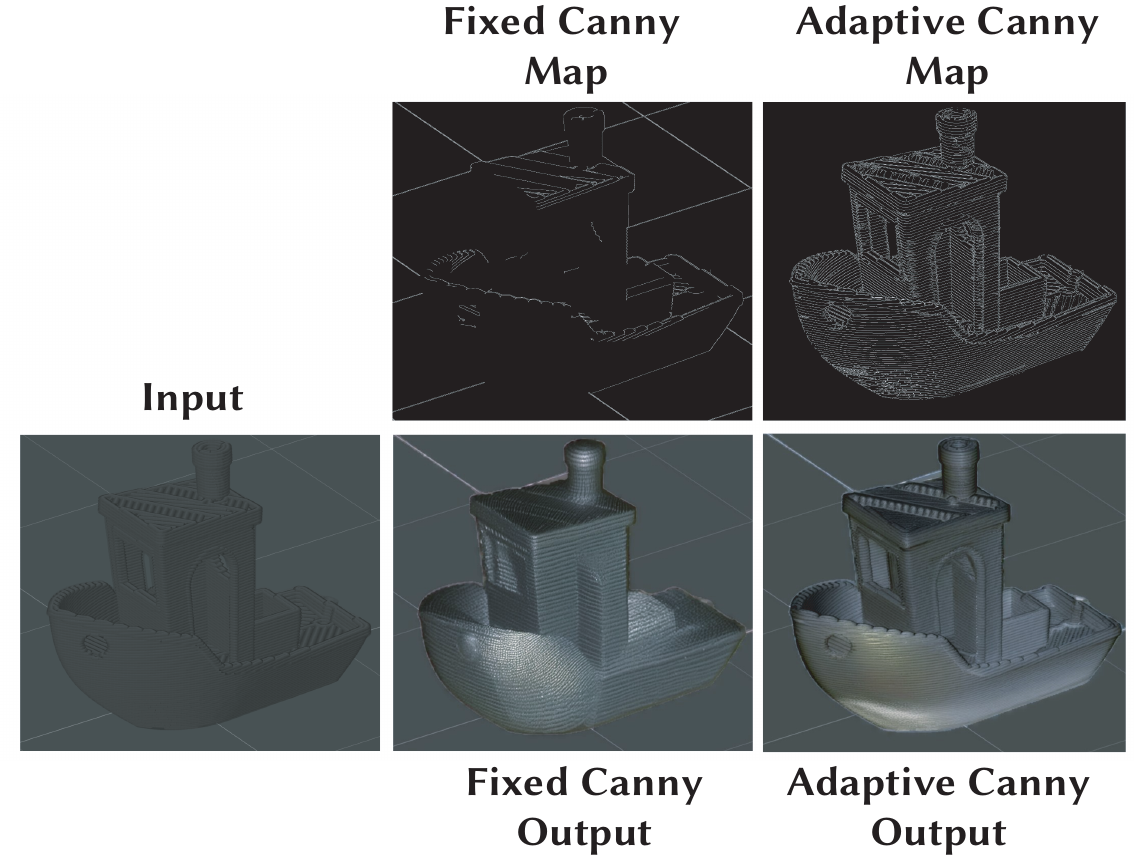 Figure 6. Visualization of a challenging, dark input with and without adaptive Canny map generation. Adaptive Canny more effectively picks up the slicing details of the input.
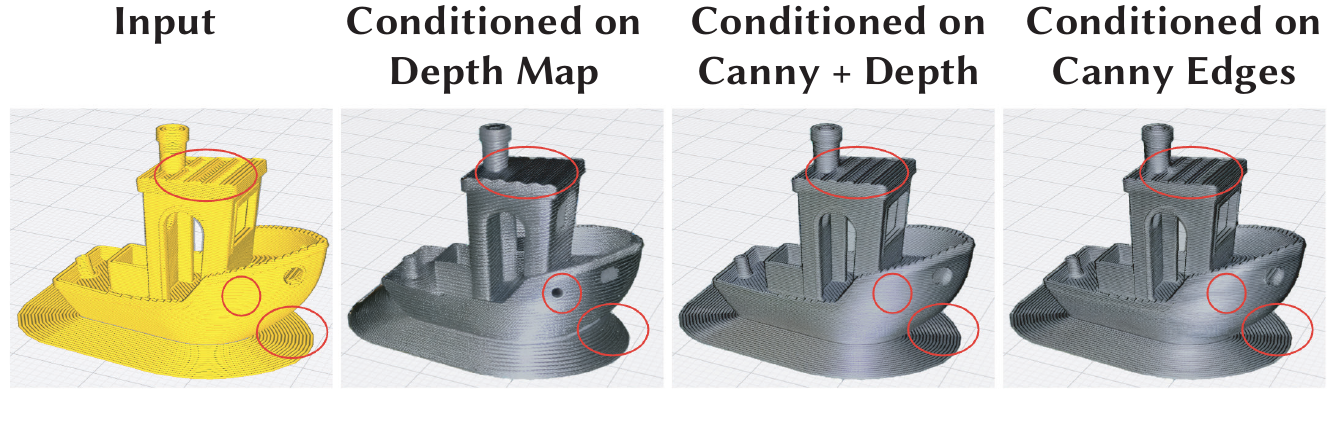 Figure 7. We use both Canny edges and depth maps for conditioning the generated images: depth-only smooths shading but loses slicing detail, while edges preserve lamination but weaken shape. Combining both balances these effects. Red-circled regions highlight depth-only errors. In hollow regions (e.g., Benchy vent), edges preserve contours while depth retains global shape. Without edges, spurious holes may appear.
As can be seen in Fig. 7, depth maps ensure shading and global shape, while Canny edges preserve slicing and internal contours. Depth alone may blur hollow regions; edges alone lose shading. Users can balance the two via a Slicing Influence slider: higher values emphasize lamination, lower values emphasize shading. Defaults balance both.
Color Correction and Artifact Reduction.
Canny edges aid structure but can shift tone. To correct this, we apply statistical color transfer within the object silhouette (eroded to reduce boundary noise). Exemplar RGB mean/variance is matched, with contrast weight 0.5 and blend factor 0.8 to avoid overcorrection. This improves tonal coherence while retaining generative detail (Fig. 8). To prevent unwanted structure from material photos (e.g., a donut hole or logo) from leaking into previews, we crop the exemplar to its foreground only. We also restrict edits to the object mask from the target view so the background does not influence results (Fig. 10).
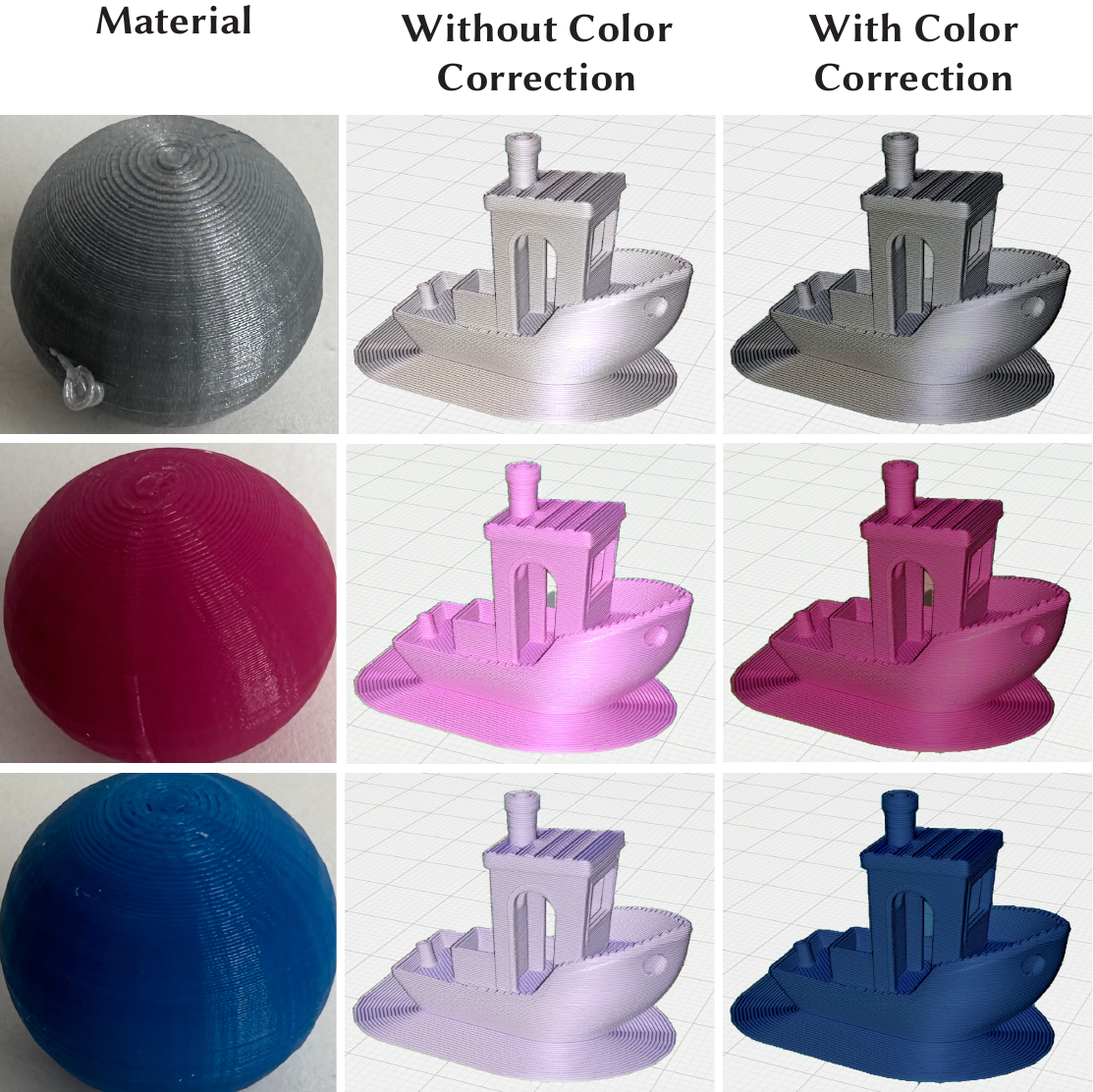 Figure 8. Color correction improves correspondence between exemplar and output.
Material Exemplar Geometry Ablation.
While users may provide any image of a printed material as an exemplar to VisiPrint, how well texture and lighting are captured is affected by the geometry of the exemplar. To identify which shapes are most effective as material example geometries, we conducted an ablation study across 12 geometries from our dataset. Each geometry was used as a material exemplar, and we evaluated the results using CLIP similarity, a metric that quantifies semantic similarity between generated previews and real photographs of printed objects. CLIP was chosen because it is more robust to variations in orientation and lighting than other metrics, making it suitable for evaluating our model’s output images against the corresponding ground-truth photographs.
We found that spheres yielded the highest similarity scores (mean CLIP = .818), likely due to their even curvature and ability to capture material qualities under varied lighting, and cylinders performed worst (mean CLIP = .795). This preference for spherical exemplars mirrors MatCap-based workflows, where a single photographed sphere is used to encode how a material responds to a fixed illumination environment and is then mapped onto arbitrary geometries. In our case, the printed exemplar's appearance is injected as a conditioning signal into the diffusion model rather than used as a direct normal-lookup texture as in classical MatCap rendering. This allows VisiPrint to preserve FDM-specific surface cues such as lamination edges and layer-line highlights via slicer-derived depth and edge maps. While the performance gap between the best and worst geometries was modest (.023), we recommend using spheres for printing a new material sample for optimal results. This finding is specific to our pipeline and default hyperparameters, and performance may vary in other settings.
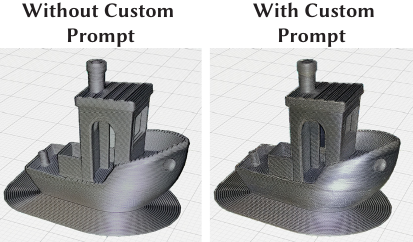 Figure 9. Silver VisiPrint boat, without a custom prompt and with the custom prompt “A very shiny 3D printed boat”. Users can adjust previews with optional prompting.
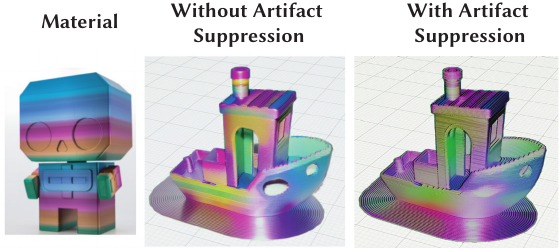 Figure 10. Cropping the material exemplar removes background pixels and reduces artifact transfer, such as the clear spurious hole on the front of the boat.
Optional Text Prompt Conditioning.
Users may provide text prompts for creative control, though this is not required or recommended for realism. By default, a BLIP caption extracts the main noun and appends it to “A 3D printed” (e.g., “A 3D printed vase”). Users can override with custom prompts that can modify the output's material appearance (Fig. 9).
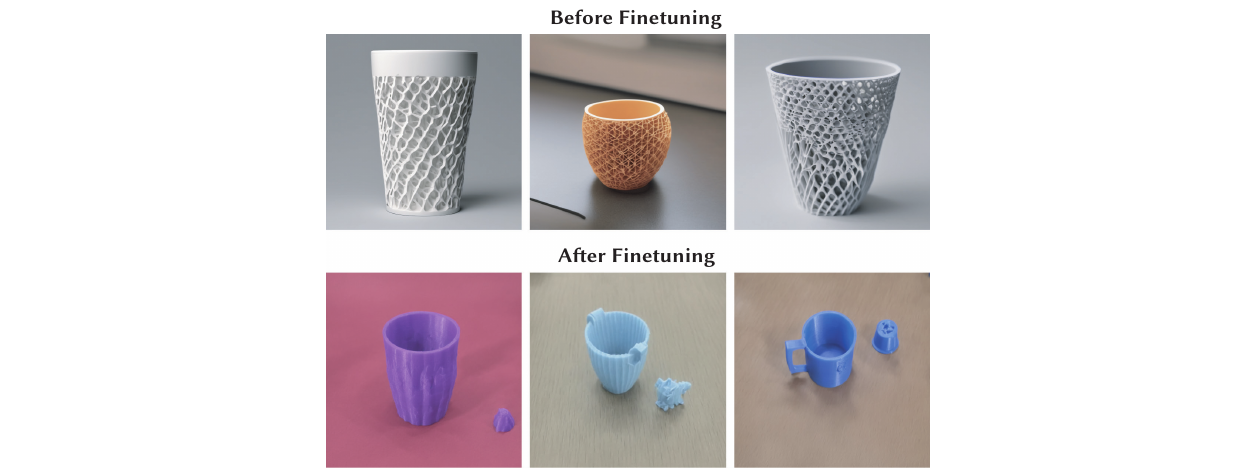 Figure 11. Top row: SDXL outputs without fine-tuning. Bottom row: SDXL outputs with fine-tuning. Fine-tuning improves generated outputs of SDXL when prompted to visualize a 3D printed cup.
Optional Fine-tuning.
While SDXL is a powerful generative model, our early experiments show that it does not handle generations of 3D printed objects well (Fig. 11). To better align SDXL with the appearance of real prints, we optionally apply lightweight LoRA fine-tuning, a computationally efficient fine-tuning approach that injects small, trainable weights into the frozen model, using 100 Creative Commons–licensed images of 3D prints. We will release this dataset of images upon publication of this manuscript.
In Figure 11, we show the effect of this fine-tuning on the SDXL model alone, by presenting generated images for the prompt “A 3D printed cup” before and after our fine-tuning approach. The cups appear more realistic and faithful to true 3D prints after fine-tuning.
Implementation.
The system is implemented in PyTorch, using diffusers for SDXL inference and fine-tuning and rembg for background removal. Our core model is StableDiffusionXL-ControlNet-Inpaint-Pipeline with two ControlNet branches (depth and edges). Depth maps are computed with DPT. Appearance is guided by IP-Adapter XL.
Optional LoRA fine-tuning runs 10,000 steps at learning rate $0.01$. Default ControlNet scales are 0.9 (depth and edges); inference uses 70 steps with seed 42. The Slicing Influence slider linearly adjusts edge vs. depth weights ($w_{\text{edge}}, w_{\text{depth}}$), initialized at 0.9 each and clipped to $[0,1]$. Preprocessing uses masks eroded with a $5\times 5$ kernel. Color correction applies histogram matching with contrast weight 0.5 and blend factor 0.8. Experiments ran on an NVIDIA A100 GPU.
Scope and Assumptions.
VisiPrint is designed primarily for FDM prints, but its approach generalizes to other technologies such as SLA. In the Supplemental, we show additional examples using resin and other materials. The system focuses on visual appearance: it previews what a print is expected to look like if fabrication is successful. It does not estimate printability, mechanical feasibility, or the likelihood of failure. Our goal is to give users a clearer sense of surface finish, material look, and color outcome—not to predict whether a print will succeed technically.
USER STUDY
We evaluate VisiPrint as an appearance-first preview aid by asking whether, before printing, it helps participants reach a preview that they judge as faster and more reliable, requiring lower workload, and offering higher realism than baselines. We report task completion, time-to-preview, perceived realism, and workload. To compare against existing 3D print preview approaches (baseline), we set up three different tools during the experiment:
- Ultimaker Cura Slicer Preview Tab: A standard slicer visualization that displays the layer-by-layer slicing pattern.
- Blender-Based Rendering: A manually configured rendering pipeline using Blender to simulate realistic materials and lighting.
- VisiPrint: Our approach, which uses generative models to transfer material appearance onto sliced 3D models.
The study examined trade-offs among ease of use, photorealism, visual fidelity, and task efficiency. While Cura and Blender do not cover the full landscape of preview tools, they are popular and accessible in printing and modeling communities. We conducted a one-hour user study in a lab environment with fifteen participants. Users were given five minutes to complete various tasks, and the completion rate for VisiPrint was $100\%$ (30/30 tasks across all participants) but only $63\%$ (19/30 tasks) for Cura and $13\%$ (4/30) for Blender. Participants consistently rated VisiPrint as significantly easier to use, less demanding, and more photorealistic than the other tools. In a perception study, previews generated by VisiPrint were rated as more realistic than those from the baseline and nearly on par with actual photographs. Beyond measuring task completion time, this workflow study was designed to probe users' perceived workload, confidence, and trust when interacting with different preview tools, reflecting the cognitive demands of real 3D-printing decision workflows rather than simply comparing interface speed.
This study received institutional approval. Participants gave informed consent and were able to withdraw at any time.
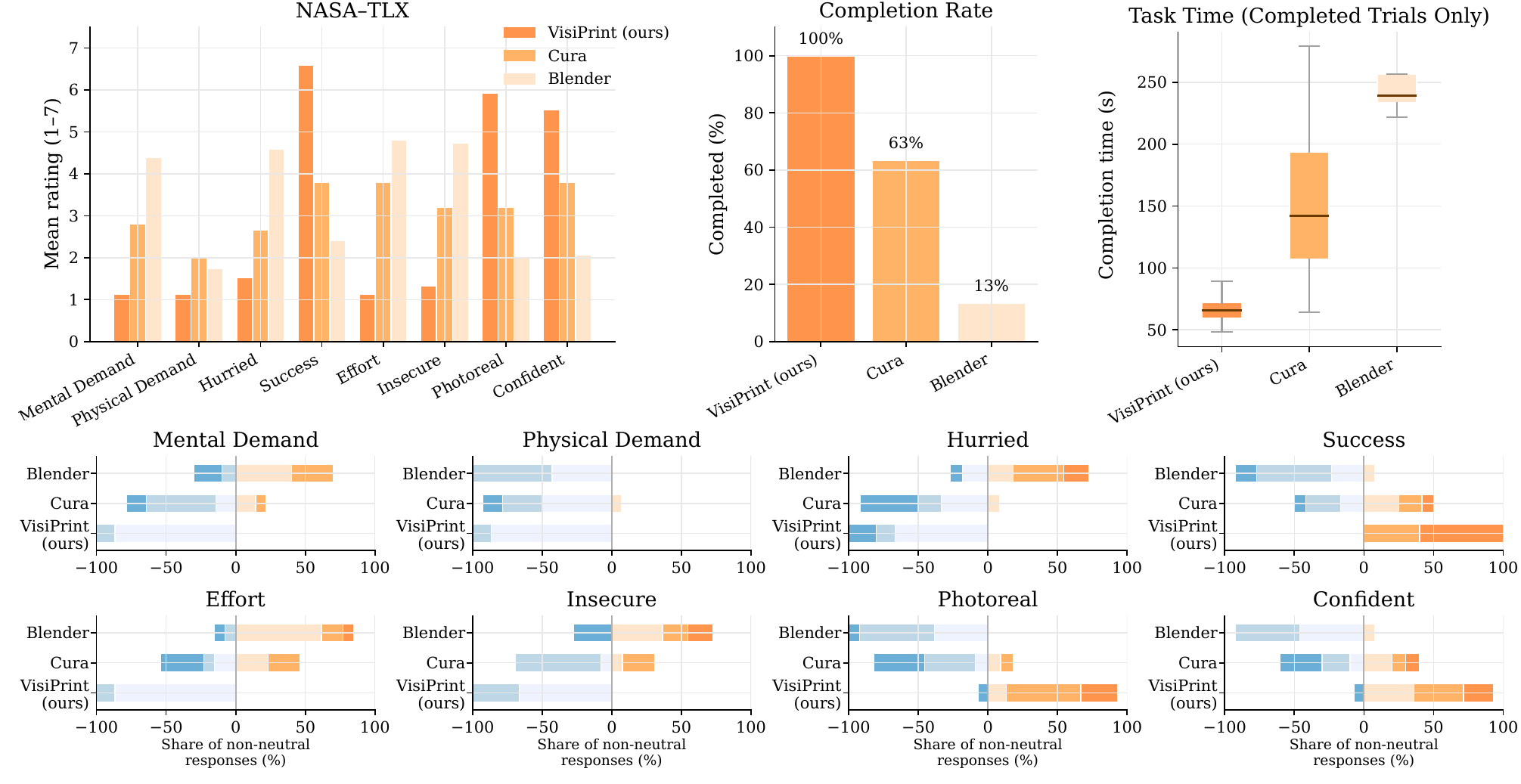 Figure 12. User study results. Top row: mean scores for the NASA-TLX and extra questions (left), task completion rate (middle), and completion times for successful trials (right). Bottom rows: distribution of non-neutral responses for individual TLX dimensions and realism/confidence ratings. VisiPrint consistently reduced workload and increased success compared to baselines, and its improvement was statistically significant across all metrics other than physical demand.
Participant Demographics.
We recruited fifteen participants (self reported genders of ten men and five women) aged 18 to 37 (with a mean age of 26.27). The participants were university students with different majors and backgrounds. All but one participant had prior experience with printing and modeling tools.
Pre-survey Questionnaire.
Process. Before starting the tasks, participants completed a background questionnaire covering:
- Prior experience with printers and modeling tools.
- Importance of visualization before printing (1 = Not at all, 7 = Essential).
- Current methods or strategies used to preview prints.
- Prior experience with different print materials (e.g., colors, plastics).
- Willingness to spend time on visualization before printing.
- Prior experience with Blender and Cura.
Results. We assessed participants’ familiarity with each tool using a 7-point Likert scale (1 = novice, 7 = expert). The mean familiarity scores were 2.63 (SD = 1.40) for Blender and 2.60 (SD = 2.26) for Cura, indicating that participants were generally knowledgeable amateurs. Participants rated print visualization as highly important, with an average score of 6.40 (SD = 0.63). The time they were willing to spend on visualization averaged 14.93 minutes, with a mode of 5 minutes. Five participants reported frequent experience with aesthetic materials, six occasional, two infrequent, and two none.
Evaluating Software Interaction Experience.
For each tool, participants completed two tasks:
Task 1: Visualize the boat in silver PLA.
Task 2: Visualize the whistle in clear PLA.
Participants' completion times were recorded, with a maximum task duration of 5 minutes. If 5 minutes had elapsed, they were prompted to stop and asked if they felt they had finished. If yes, time was recorded as 5 minutes; if not, the task was marked incomplete. Tool order was rotated with a Latin-Square to reduce order effects.
To isolate software interaction from asset preparation (studied separately in the Supplemental), some resources were pre-provided:
- Blender: curated texture maps for silver and clear PLA or built-in materials.
- VisiPrint: sliced screenshots and images of the silver and clear PLA references.
Results.
Completion Rates and Times. Completion rates per software tool were 30/30 for VisiPrint, 4/30 for Blender, and 19/30 for Cura. For completed tasks, average completion times were $66.4$ s (SD = $10.0$) for VisiPrint, $158.5$ s (SD = $64.9$) for Cura, and $250.2$ s (SD = $34.2$) for Blender (Figure 12). These results show a sizable improvement for VisiPrint over both baselines in both completion rate and task time.
NASA-TLX. After each task, participants completed NASA-TLX and two extra 7-point Likert questions: (i) “How photorealistic was the result?” (1 = Not at all, 7 = Extremely) and (ii) “How confident are you that the preview matches the real object?” (1-7). For VisiPrint specifically, they also answered: “Did the automatic visualization help with previewing the print?” (1-7).
We used non-parametric tests for within-subjects ordinal data. For each subjective metric, a Friedman test assessed overall differences across the three tools. If the Friedman test was significant, we ran Wilcoxon signed-rank tests for pairwise comparisons with Holm-Bonferroni correction for multiple comparisons. We report statistical significance at $\alpha=0.05$, with all raw p-values listed in Table 1. Significant results at $p<.05$ (after Holm-Bonferroni correction) are shown in boldface. VisiPrint was rated as significantly lower-effort, less mentally demanding, less hurried, and more successful than both Blender and Cura. Participants also reported feeling less insecure, perceiving higher photorealism, and expressing greater confidence in the resulting prints.
| Metric | Friedman | VisiPrint vs Blender | VisiPrint vs Cura |
|---|---|---|---|
| Mental Demand | .000016 | .000650 | .003483 |
| Hurried | .000036 | .001576 | .017679 |
| Success | .000006 | .000655 | .001024 |
| Effort | .000009 | .000647 | .001498 |
| Insecure | .000049 | .000682 | .003483 |
| Photorealism | .000005 | .000974 | .000686 |
| Confidence | .000123 | .001149 | .008519 |
For VisiPrint, the extra question “Did the automatic visualization help with previewing the print?” had a mean score of 6.20 out of 7.
User Perception Study.
Process. Participants held the actual 3D-printed object (a silver boat and a clear whistle) while viewing side-by-side previews from each tool (Fig. 13) and photographs of that same object. In this setup, the physical print serves as the ground-truth baseline: all similarity ratings are made with the real 3D-printed artifact in hand, rather than relative to another preview. Each set included: (a) Blender uniform, (b) Blender PBR, (c) Cura yellow, (d) VisiPrint, (e) photo of the printed object, and (f) Cura silver (boat) or Cura clear (whistle). Backgrounds were removed. Participants rated each image on 7-point Likert scales (1 = no resemblance, 7 = exact match) for three metrics: overall similarity, texture similarity, and slicing similarity. They also provided full rankings for each metric.
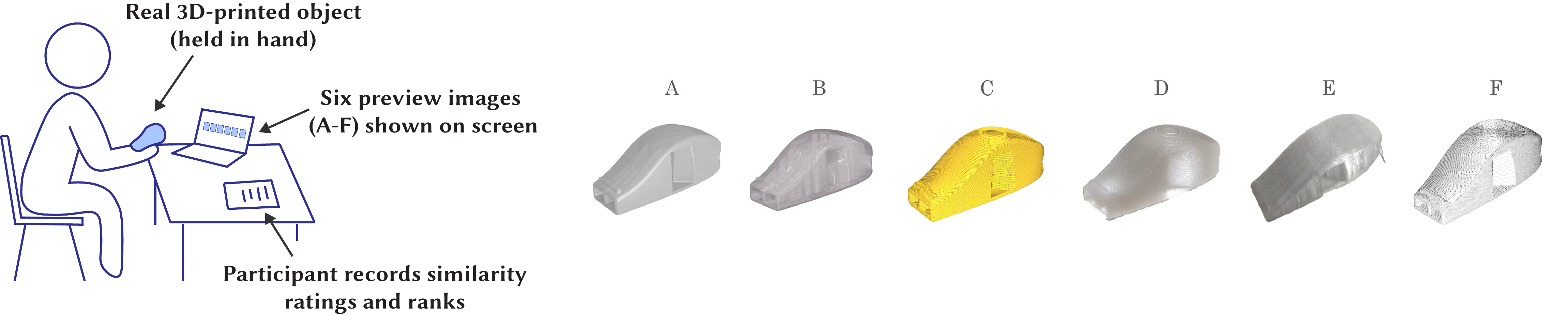 Figure 13. Left: Perception study setup. The participant holds the real 3D-printed object and compares it to six different previews on a screen, recording their results. Right: Example row of options shown in the perception study. From left to right we show the options participants were given: Blender uniform texture, Blender PBR texture, Cura default color, VisiPrint, a real-world photograph of the actual object and Cura “clear PLA”.
Results. We collected Likert-scale ratings and rankings for each model and metric. Figure 14 shows a visualization of both Likert-scale ratings and average rankings for the boat model. Notably, the profile of VisiPrint closely tracks that of a photo across most conditions. For slicing similarity, Cura previews sometimes matched or outperformed VisiPrint and the photo, which is expected given Cura’s primary function as a slicing visualization tool. For overall and texture similarity, however, Cura consistently lagged behind VisiPrint. In a handful of cases, participants ranked VisiPrint ahead of the real photograph, suggesting that lighting conditions in photos may bias perception. The perception study was structured not merely to rank previews, but to examine when users treat VisiPrint previews as interchangeable with photographs of the actual object, and how this judgment shifts across filaments, materials, and baseline methods—providing insight into expectation-setting, rather than simply demonstrating that VisiPrint performs well.
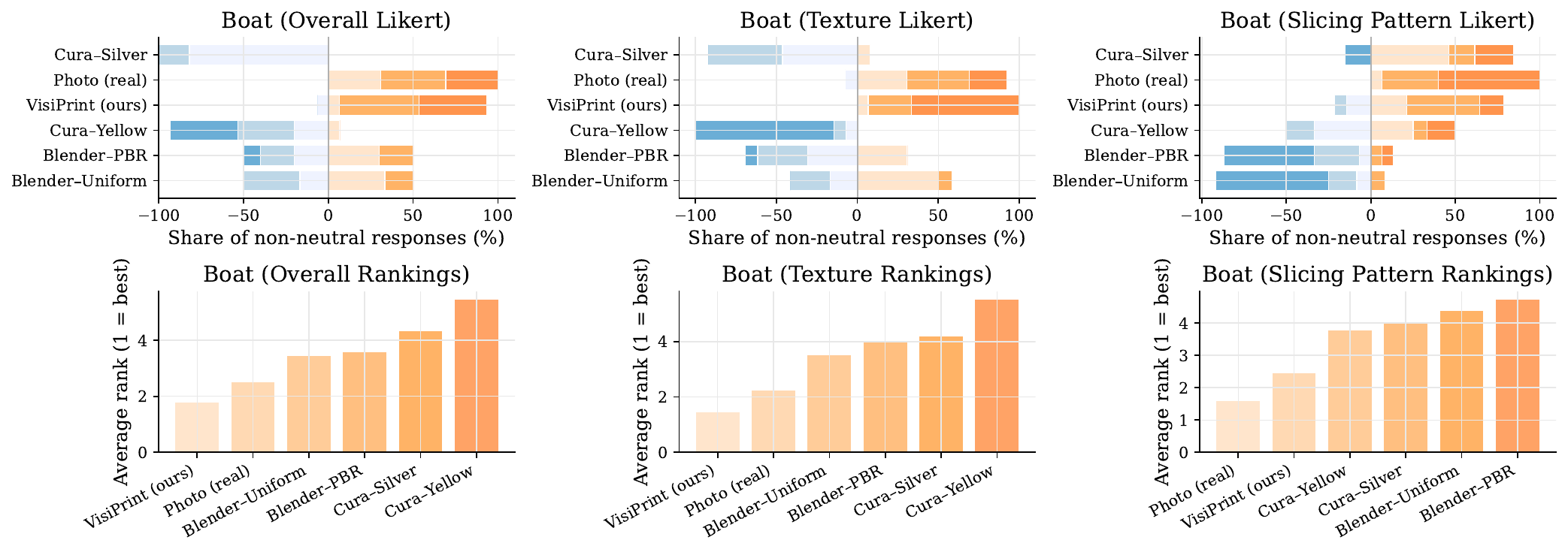 Figure 14. Perception study (boat). Top row: distribution of non-neutral Likert responses for overall, texture, and slicing similarity. Bottom row: average participant rankings. VisiPrint and photos were statistically indistinguishable and ranked highest, with Cura silver mid-tier and Blender/Cura yellow lowest.
Overall Appearance. Both whistle and boat conditions showed significant differences across methods (Whistle: $\chi^2=36.53$, $p<.001$, $W=.459$; Boat: $\chi^2=47.38$, $p<.001$, $W=.602$). For the whistle, VisiPrint was significantly higher than Cura-Yellow and comparable to both the photo and Cura-Clear, while all three outperformed the Blender baselines. For the boat, VisiPrint and the photo formed the top tier, rated higher than most baselines and not statistically differently from one another. Cura-Silver fell in between the top tier and the weaker baselines.
Texture Similarity. Texture ratings again showed significant differences (Whistle: $\chi^2=46.42$, $p<.001$, $W=.602$; Boat: $\chi^2=53.58$, $p<.001$, $W=.690$). For both objects, VisiPrint and the photo were rated highly and were not significantly different from each other. Both consistently outperformed Blender-Uniform, Blender-PBR, and Cura-Yellow. For the whistle, Cura-Clear also achieved strong ratings, significantly better than the Blender baselines, while for the boat, Cura-Silver received moderate scores.
Slicing Similarity. Slicing comparisons also yielded significant effects (Whistle: $\chi^2=44.46$, $p<.001$, $W=.534$; Boat: $\chi^2=51.15$, $p<.001$, $W=.611$). For both objects, VisiPrint and the photo were not significantly different from each other and outperformed the Blender baselines. As expected, slicing-focused previews from Cura performed competitively in this dimension: Cura-Clear for the whistle and Cura-Silver for the boat matched or surpassed some baselines, reflecting their emphasis on visualizing slicing patterns.
Summary. Across both objects, VisiPrint achieved perceptual similarity on par with photographs and significantly outperformed slicer previews. Blender PBR improved shape and overall appearance but generally lagged behind VisiPrint and photos.
Post Survey.
Participants completed a post-study survey covering: (1) preferred tool for photorealistic print preview (Blender, Cura, or VisiPrint) with justification; (2) overall VisiPrint experience (7-point Likert); (3) willingness to use VisiPrint again and reasons; (4) extent to which VisiPrint aided print preview (1–7) with explanation; (5) anticipated frequency of using VisiPrint for prototyping (1–7) with example cases; (6) perceived reliability of visualizations (1–7) with elaboration; (7) suggested improvements; (8) applications where VisiPrint would be most helpful; (9) reflections on what they learned; and (10) any additional comments.
Twelve out of the fifteen participants said they would prefer to use VisiPrint instead of just Cura alone or Blender alone for print visualization, and three participants said they would prefer to use just Cura. The mean experience score was 6.33 out of 7, the mean answer to how much VisiPrint helped was 5.33 out of 7, and the mean answer to how reliable the previews were was 6.27.
Fourteen out of the fifteen participants expressed that they would use VisiPrint again in the future, with a mean score of 4.60 when answering how often they would use it when doing 3D-print preview. Participants proposed a range of applications for VisiPrint, including product design where appearance matters (e.g., P4 said “Product design focused applications, where visual appearance matters”), exploring new materials (e.g., P2: “It would be nice to visualize new materials on print jobs”), and fine-tuning models late in the design process (e.g., P3: “I would use it mostly at the end of a modeling process to fine-tune details and confirm material selection”). Some noted limited use for everyday prints (e.g., P6: “Probably won’t need to preview appearances, I imagine product designers need it”).
Participants found VisiPrint to be highly accurate and visually realistic (e.g., P7: “I thought it was photorealistic,” P8: “They look like the material I’m trying to use,” P9: “The boat and print were very accurate to each other”), and appreciated its ease of use (e.g., P1: “It was very easy to use,” P8: “Cool stuff”). However, several participants noted limitations such as the lack of a 3D preview or orbiting view (P3: “Would be cool to rotate the object and view it from different angles”), and a desire for more interactivity and integration (P3: “I would like to provide a 3D model instead of a single image”). Trust and understanding of the system also came up (P2: “An understanding of the algorithm would better ground the trust I place in the visualizations”).
We mitigate learning and order effects via a within-subjects design with counterbalanced condition order and standardized task scripts. Hawthorne effects remain possible in any tool-comparison study; we reduce them by avoiding feedback during tasks and by using identical prompts across conditions. Our findings center on appearance-related decisions rather than print success, consistent with VisiPrint’s intended use.
ADHERING TO RESPONSIBLE USE OF AI FOR FABRICATION PREVIEWS
In our study (Section 5), participants’ confidence in VisiPrint previews was lower before seeing the real object in question than it was after inspecting the real physical prints, suggesting that they treated images as provisional rather than guarantees. Nonetheless, as preview realism improves, as with any pipeline that incorporates computer-vision material transfer or generative models, we acknowledge the risk of over-trusting the outputs of the model may grow. Prior work shows that explicitly communicating the limitations and fallibility of AI systems helps calibrate users' expectations and reduces both over- and under-reliance on automated advice. Following guidance on calibrated trust, we implemented the following safeguards into VisiPrint:
System safeguards: Unlike some generative models such as GPT-5, VisiPrint previews are tailored with a custom computer-vision algorithm, conditioned on slicer screenshots with geometry and layer cues preserved to keep outputs tied to toolpaths and prevent geometry hallucination; the UI warns if strong text prompting may reduce faithfulness; a single Slicing Influence slider exposes the trade-off between edges (lamination detail, vents/holes) and depth (global shape/shading); and all outputs are labeled “Simulated Preview” to set expectations.
User guidelines: We also provide the following guidelines for users, which are included in a pop-up to the User Interface: “Use VisiPrint only for visible appearance (sheen, hue tendencies, layer-line direction, seam/banding) not for printability, strength, tolerance, or safety, and always pair it with slicer checks and for high-stakes parts, a small test print. Know that VisiPrint is designed for previewing sliced 3D prints and tested primarily on FDM printing. And do not use VisiPrint previews as an indicator of likely print success for safety-critical parts (e.g., load-bearing or clinical), keeping records of slicer view, model/weights (incl. LoRA), conditioning scales, seed, and exemplar reference for auditability.”
These safeguards and guidelines aim to keep trust calibrated: previews reveal slicing patterns and material appearance before printing, without being mistaken for evidence that a print will succeed, and our findings thus complement broader HCI work on expectation-setting and AI-assisted creativity, which emphasizes transparency and user control when integrating generative tools into designers' workflows.
TECHNICAL EVALUATION
We evaluate VisiPrint using both a user study and technical benchmarks. Users provide the most meaningful signal of utility; quantitative metrics (PSNR, LPIPS, CLIP) are included as additional checks that compare each preview against a photograph of the corresponding actual 3D-printed object.
Input preparation. All methods used the same models and material exemplars. Aspect ratios were matched to avoid distortion; outputs were foreground-masked for quantitative metrics. Diffusion-based methods (VisiPrint, ZeST, IP-Adapter) used identical screenshots, exemplars, defaults, and seeds. Cura previews hid non-print moves with a neutral theme. As using GPT-5 is non-deterministic even for a fixed prompt, we prompted the model twice with the same prompt to show variations across two distinct attempts.
Dataset.
We built a dataset of twelve objects: 8 popular Thingiverse models plus 4 primitives (sphere, torus, cylinder, cube). All were printed in four filaments—solid pink, solid blue, clear white, and metallic silver, chosen to span translucency, specularity, and matte vs. glossy finishes. Ground-truth photos were captured under diffuse lighting with fixed camera distance and neutral backgrounds, with the same setup as described in Section 4.1, and object orientation matched slicer views. This qualitative alignment was performed by manually rotating the physical object to visually resemble the slicer view, not via any automatic registration, but was held constant across baselines. Thus, for each filament, the exemplar sphere and the corresponding evaluation photos of printed objects share the same illumination environment. Printer/slicer settings were held constant within each color (full details in the Supplemental).
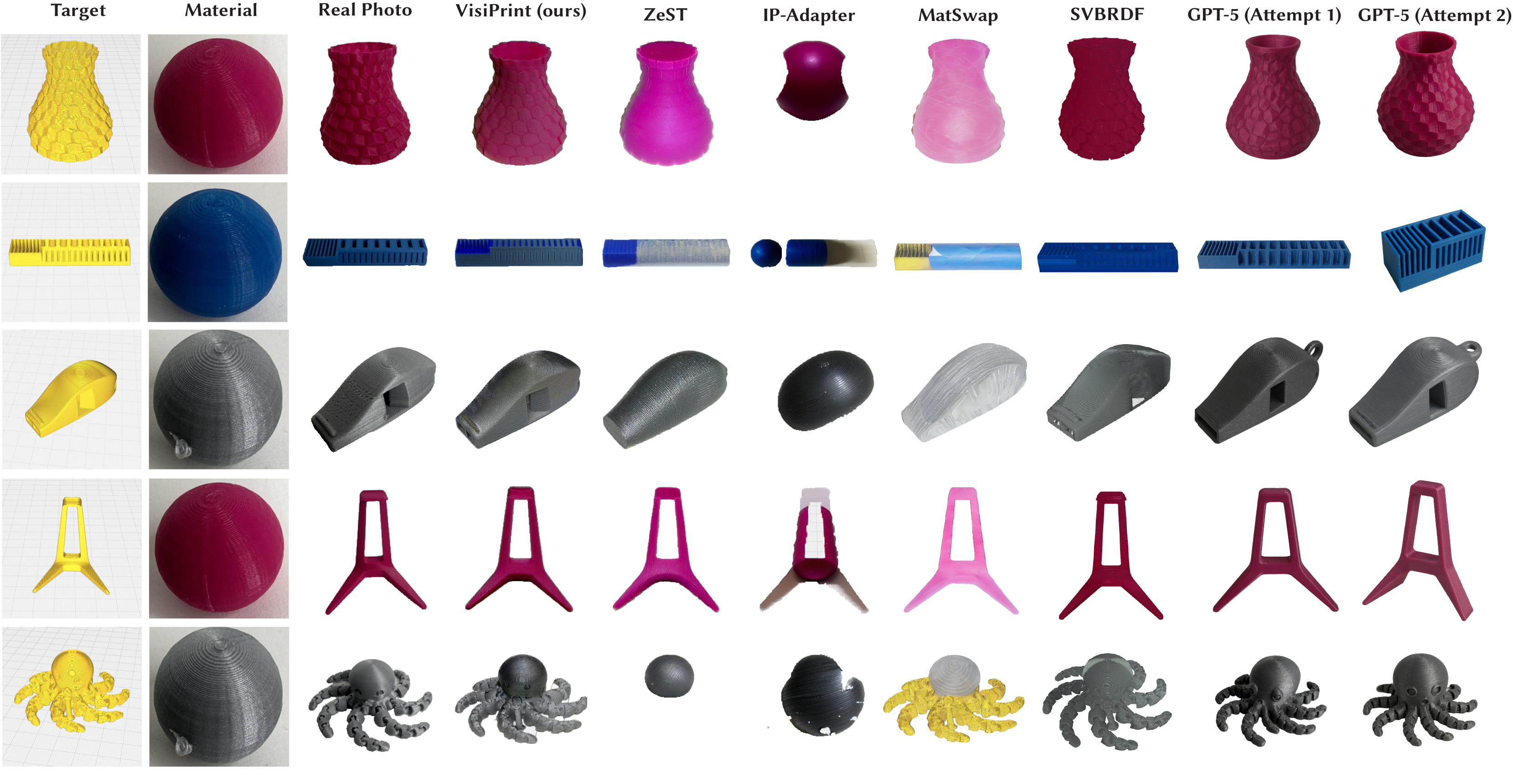 Figure 15. Left: ground-truth photographs of 3D printed objects from Thingiverse, with sliced geometries and material samples. Right: previews from VisiPrint and baselines. VisiPrint best combines material fidelity, slicing, and geometry.
Qualitative Evaluation.
We compared previews from: (i) ground-truth photos, (ii) VisiPrint, and baselines. All methods used the same models and exemplars. Figure 15 shows representative results. Across all models, only VisiPrint and Cura consistently preserved shape and slicing; ZeST introduced blocking artifacts, and GPT-5 hallucinated geometry. On specular materials (like the whistle and octopus), VisiPrint, ZeST, and GPT-5 captured shininess, but only VisiPrint and Cura preserved slicing patterns. Unlike GPT-5, VisiPrint and ZeST support arbitrary aspect ratios without stretching, and are geometry-aware and deterministic. Overall, VisiPrint qualitatively best balances geometry, slicing, and material (Table 2).
| VisiPrint | ZeST/IP-Adapter | Cura | GPT-5 | |
|---|---|---|---|---|
| Geometry | Yes | Yes | Yes | No |
| Slicing | Yes | No | Yes | No |
| Material | Yes | Yes | No | Yes |
Quantitative Evaluation.
We compared VisiPrint against ZeST, IP-Adapter, MatSwap, and Single-Image SVBRDF estimation, using their official code releases, with results shown in Table 3. Evaluation metrics include PSNR, LPIPS (VGG), and CLIP similarity, computed against photographs of real 3D-printed objects.
| Method | PSNR ↑ | LPIPSVGG ↓ | CLIP ↑ |
|---|---|---|---|
| VisiPrint (Ours) | 15.587 ± 3.470 | 0.278 ± 0.078 | 0.911 ± 0.040 |
| ZeST | 14.567 ± 3.165 | 0.285 ± 0.074 | 0.887 ± 0.043 |
| IP-Adapter | 12.446 ± 2.532 | 0.306 ± 0.070 | 0.823 ± 0.056 |
| MatSwap | 11.506 ± 2.220 | 0.298 ± 0.080 | 0.865 ± 0.041 |
| SVBRDF | 11.518 ± 3.226 | 0.324 ± 0.092 | 0.887 ± 0.043 |
For the SVBRDF baseline, we used “sliced” STLs with the ground-truth slicing patterns extracted from GCode using GCode2STL to ensure a fair geometric comparison with our method. We estimated material maps (diffuse albedo, specular albedo, roughness, normals) from each exemplar using [Deschaintre et al. 2018]. While single-image SVBRDF capture assumes planar material samples, we use the same sphere exemplar images as in other baselines to keep the inputs consistent across methods. We crop to the central 50% of the image to prevent background whitespace from appearing in the material maps, which reduces the amount of curvature in the image. However, as the surfaces are not flat, the resulting maps may be suboptimal. See the Supplemental for preprocessing and reproducibility details as well as a discussion of how the material images were adapted for use with the SVBRDF code, including material maps and details on alignment results.
Camera elevation and azimuth were manually specified per object to closely match the ground-truth photograph viewpoint. Ambient and directional light intensities were calibrated once by minimizing RGB error on a held-out reference photograph, then fixed for all renders. While MatCap is conceptually similar—mapping a photographed sphere to arbitrary geometry—we do not include MatCap as a baseline in Table 3 because there is no standard, open-source implementation that can be applied directly to slicer screenshots and our dataset. Backgrounds were removed and metrics averaged across 48 object–material pairs.
VisiPrint achieved the highest PSNR (15.587), LPIPS (.278), and CLIP (.911), indicating that its performance quantitatively exceeds the closest baselines in pixel-level fidelity, perceptual similarity, and semantic alignment with the ground-truth appearance. This is a demanding benchmark, since we compare against real-world photographs whose lighting and other capture conditions can influence scores, and the CLIP differences are modest; we do not claim statistical significance. While the quantitative results highlight VisiPrint's capabilities, we treat these metrics as complementary to—but less decisive than—the qualitative user study comparisons.
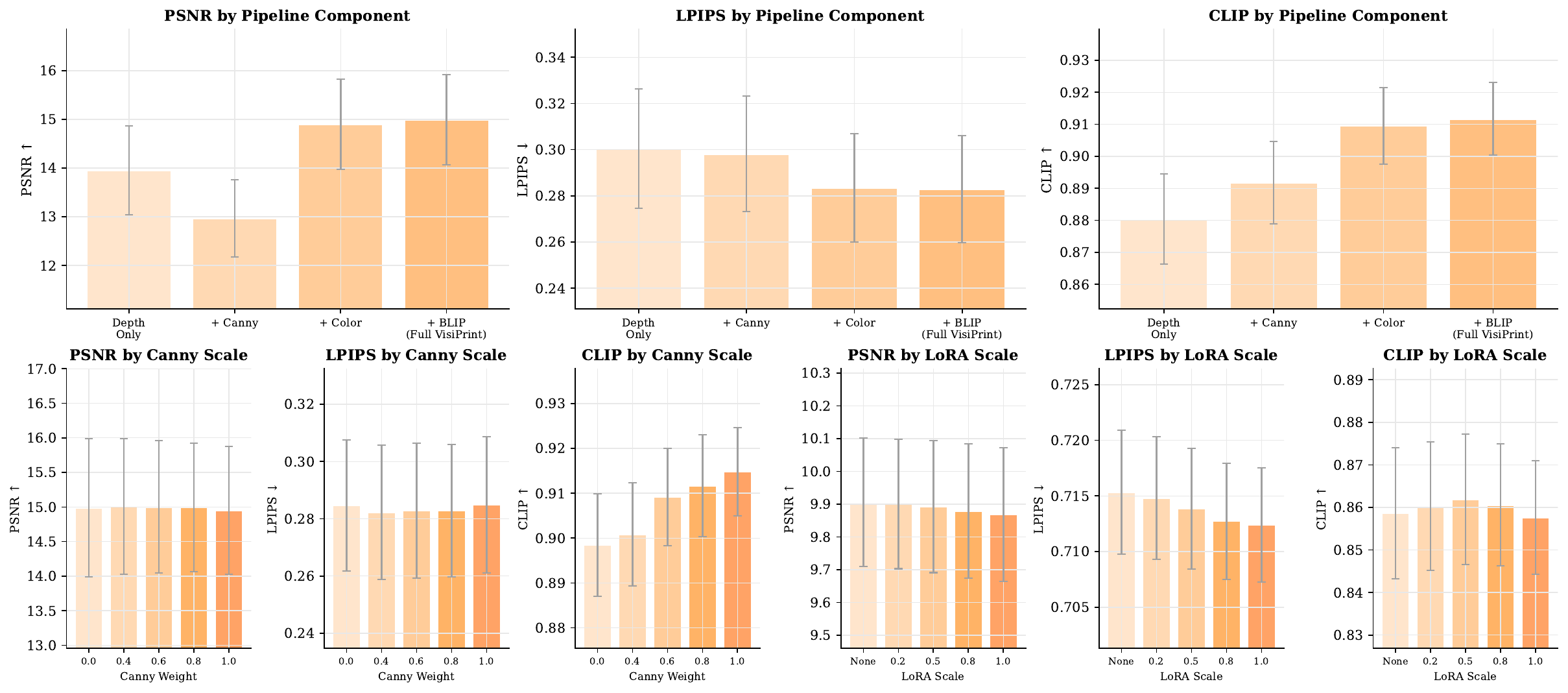 Figure 16. Ablation study results. Top: Component ablation showing gains from adding Canny conditioning, color harmonization, and BLIP prompts to a depth-only baseline; color harmonization yields the largest improvement. Bottom: Sweeps over Canny weight (left) and LoRA scale (right). Higher Canny weights improve semantic consistency (CLIP $\uparrow$), while LoRA fine-tuning provides minor perceptual benefits. $y$-axes are zoomed to data range; arrows indicate preferred directions. Error bars show 95% confidence intervals.
Ablation Study.
We evaluate the contribution of each component in the VisiPrint pipeline across 12 target objects and 4 material exemplars (48 test pairs), with results shown in Fig. 16. Starting from a depth-only ControlNet baseline ($w_d{=}0.8$, $w_c{=}0$ for Depth and Canny weights), adding Canny conditioning ($w_c{=}0.8$), color harmonization, and BLIP prompts produces progressively better results. Color harmonization delivers the largest improvement, increasing PSNR by $1.93$ and CLIP by $0.018$ relative to the Canny-only configuration, and the full pipeline achieves the strongest overall performance (PSNR = 14.99, CLIP = 0.912). To assess sensitivity to Canny conditioning, we sweep $w_c \in \{0.0, 0.4, 0.6, 0.8, 1.0\}$ while holding $w_d{=}0.8$. Increasing the Canny weight improves semantic consistency (CLIP) with minimal impact on PSNR or LPIPS, with $w_c{=}0.8$ offering a good balance of edge fidelity and generative flexibility. Finally, varying the LoRA finetuned-weights scale $\{0, 0.2, 0.5, 0.8, 1.0\}$ produces modest perceptual gains (LPIPS from 0.715 to 0.712) while leaving PSNR and CLIP largely unchanged, indicating that LoRA contributes incremental refinement atop an already capable base model.
LIMITATIONS
While VisiPrint improves the visual fidelity of 3D print previews, several limitations remain. First, the method relies on monocular depth estimation and Canny edges extracted from slicer screenshots; these can introduce artifacts in hollow or detailed regions. Second, preview quality depends on the exemplar photo: poor lighting, low contrast, or misalignment can reduce realism, particularly for user-provided inputs. Our photo-slicer pose alignment is manual rather than optimization-based, reusing a visually matched pose across all methods instead of performing automatic camera registration.
As with MatCap previews and exemplar-driven methods such as ZeST and MatSwap, VisiPrint inherits the exemplar’s lighting and does not support arbitrary relighting. Previews may therefore diverge under different illumination, though users can provide exemplars captured in alternate environments. The system thus offers expectation-setting under a specific lighting setup rather than the relighting flexibility of physically based rendering.
We intentionally favor an exemplar-driven pipeline over SVBRDF or inverse-rendering methods, which require controlled capture, calibrated cameras, and dedicated renderers. VisiPrint instead operates from a single uncalibrated photo and a slicer screenshot, trading physical interpretability for speed and accessibility while maintaining competitive fidelity relative to MatSwap and single-image SVBRDF baselines. VisiPrint is currently optimized for FDM printing with standard PLA filaments; materials with complex optical properties (metallic, translucent, multicolor) may not be fully captured, and we have not evaluated performance on SLA/resin prints. Importantly, the method does not model physical feasibility or support-structure artifacts and is not a substitute for slicer validation. Instead, it complements existing tools by offering a visual approximation of expected appearance.
CONCLUSION
We introduced VisiPrint, a photorealistic preview tool for 3D printing that incorporates both material appearance and slicing structure, enabling users to visualize how prints will look before fabrication. Our method operates as a post-slicing step and is agnostic to printer or slicer type. By bridging the gap between input 3D models and the actual physical output, VisiPrint lays the groundwork for future intelligent fabrication tools that support faster, more informed, and aesthetics-driven prototyping.
ACKNOWLEDGEMENTS
We thank Leonardo Hernández Cano for their support, and gratefully acknowledge the support of the MIT MAD (Morningside Academy for Design) Fellowship, and the MIT MathWorks Fellowship.
BIBTEX
@inproceedings{PerroniScharf2026VisiPrint,
  author    = {Maxine Perroni-Scharf and Faraz Faruqi and SooYeon Ahn and Raul Eduardo Hernandez and Szymon Rusinkiewicz and William Freeman and Stefanie Mueller},
  title     = {VisiPrint: Previewing 3D-Print Appearances from Real Material Samples},
  booktitle = {Proceedings of the 2026 CHI Conference on Human Factors in Computing Systems (CHI '26)},
  year      = {2026},
  doi       = {10.1145/3772318.3790851}
}

